TNDD AI Builder Workflow Toolkit
Make Claude Code and Codex feel more like Lovable
I built a command centre for AI-assisted development because I kept losing my mind between prompts
ShipYard is a manual-first command centre for AI-assisted development. Here's why I built it, how it works, and what's coming next.
By The Non-Developer Developer
Here's the honest version of how this happened.
I'm not a developer. I build software using AI tools like Claude Code, Codex, and Lovable, and I've shipped real products using this approach: an internal CRM for my manufacturing business, a two-sided booking marketplace, and various smaller tools along the way.
For a while, the workflow looked like this: open a project, remember what I was doing, construct a prompt in my head, paste it into Claude Code or Codex, wait, see what happened, lose track of what actually changed, repeat. Sometimes it worked. Often I'd come back two days later and have almost no memory of where I'd left off or why certain decisions were made.
The tools themselves aren't the problem. Claude Code is genuinely excellent. Codex is powerful. Lovable is great for getting UI off the ground fast.
The problem is the space around the tools. The workflow layer that nobody really talks about.
The gap nobody talks about
When you're a solo builder or a small team using AI to ship software, you're essentially running a development operation without any of the supporting infrastructure that a real team would have. No sprint board that actually reflects reality. No decision log. No "why did we build it this way" document that gets maintained.
You've got a repo, a few AI tools, and whatever you can hold in your head.
Most of the time that's fine, until it isn't. Until you're six months in and can't remember why the schema is structured the way it is. Until you're handing a project brief to Codex and realising you've described the same context five different ways across five different prompts. Until you finish a session, close the laptop, and the entire working memory of what just happened evaporates.
I started trying to fix this for myself. What I built is called ShipYard.
What it actually is
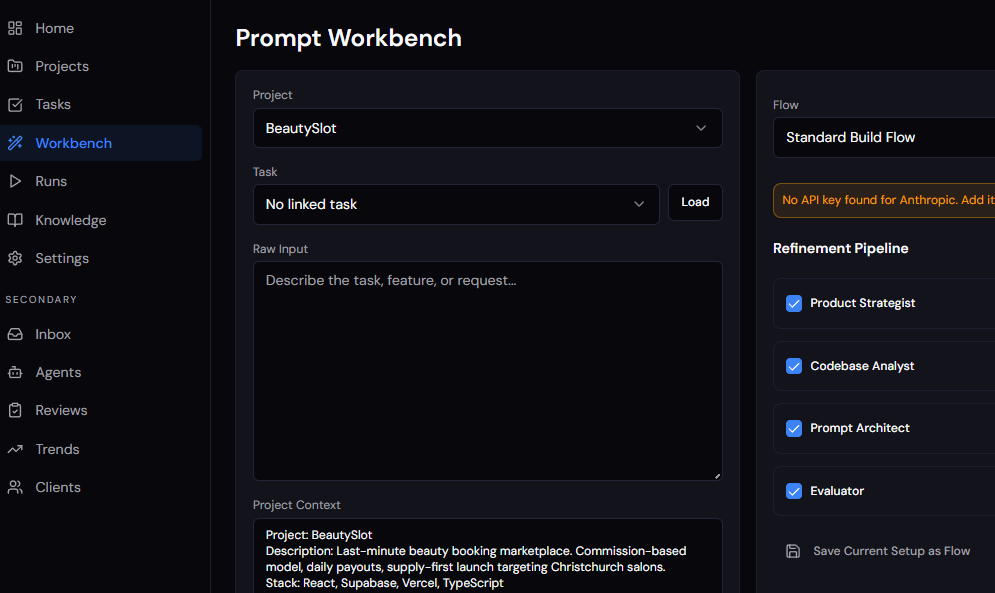
ShipYard is a manual-first workspace that wraps around the external AI tools you already use. It doesn't run code. It doesn't pretend to be autonomous. It doesn't secretly rewrite your project records.
Here's how the main pieces fit together.
Project context that lives somewhere. Stack, principles, constraints, repo links, status, team notes, all in one place, structured so an AI can consume it cleanly when you need it to.
An inbox and task manager. This is where work comes in before it's ready to act on. You capture raw requests, ideas, bugs, and follow-ups into the inbox without needing to structure them immediately. From there you refine them into tasks with proper context, effort estimates, and status. The important part: any task in your queue can be pulled directly into the prompt workbench. You're not copying and pasting context across tools, you're pulling the exact task you're working on into the thing that builds your prompt. The task details, project context, and relevant memory all come with it.
The prompt workbench. This is where prompts actually get built. Instead of assembling a prompt from memory, you're working with a set of structured inputs: the project context, the task you've pulled in, relevant memory from past runs, recent run history, and reusable agent flows. The workbench pulls all of that together and the output is a stronger, more consistent prompt you can send to your execution tool.
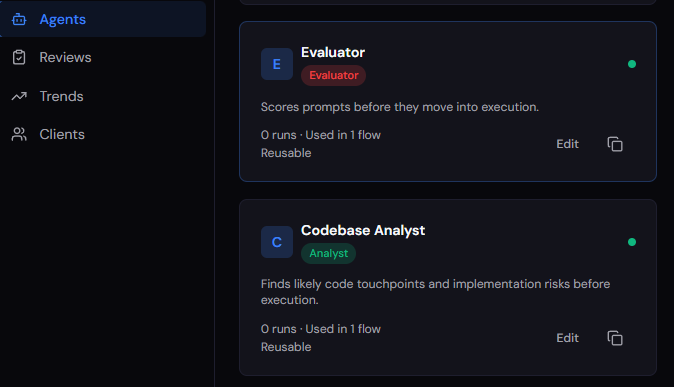
The workbench also supports custom agents. You create agents that represent specific roles or perspectives, things like a senior code reviewer, a security checker, a UX critic, or a project architect. Each agent is backed by either Claude or OpenAI, and you choose which model powers which agent based on what you need. You might run a Claude-backed architect agent to think through structure and constraints, then pass the output to a GPT-4o-backed reviewer agent to pressure-test the approach from a different angle. These agents run through the workbench as part of a configurable workflow. So instead of generating one generic prompt, you're running your task through a sequence of AI-powered agents that each contribute something specific, resulting in a prompt that has been stress-tested from multiple angles before it ever gets sent anywhere. The agent workflow is what takes a decent prompt and turns it into a precise one.
Why prompts are run manually right now. You'll notice the current workflow has you copying the finished prompt and pasting it into Claude Code or Codex yourself. That's deliberate. I wanted to get the context capture, memory system, and workbench logic right before connecting it to anything that runs code automatically. Sending a bad prompt somewhere that just executes is worse than sending no prompt at all.
That said, direct integration is coming. Once I'm confident in the quality of what the workbench produces, I'll add auto-send to Claude Code and Codex so you can trigger execution directly from ShipYard. The manual step right now is a trust-building exercise, not a permanent feature.
A manual run log. After you execute externally, you come back and record what happened. Not a vibe summary. Actual structured notes: files changed, issues encountered, testing done, what comes next. This is the piece most people skip and the one that matters most six months later.
Project memory, actively maintained by AI. This is one of the most important parts of the system and where I've spent the most time getting it right. ShipYard doesn't just store memory passively. After every run you log, the built-in AI layer, running on Claude or OpenAI depending on your preference, reviews what happened and actively works to update the project memory. It identifies decisions that were made, issues that surfaced, patterns that are emerging across runs, and knowledge that's worth keeping. It drafts updates to your memory, flags what's changed, and shows you what it thinks should be promoted to durable knowledge.
Every suggestion comes with a confidence level and a short reasoning note so you understand why it's making that recommendation. Nothing overwrites what you've already written without you choosing to accept it. Bulk acceptance is conservative: it fills gaps and merges non-duplicate items, it doesn't bulldoze existing records.
But the direction of travel is clear. The longer you use the system, the more the project memory fills out, becomes accurate, and becomes genuinely useful context for your next prompt. The AI is doing the work of keeping the knowledge current so you don't have to manually curate it after every session. By the time you're back at the workbench for the next task, the memory layer already reflects what happened last time.
Why I'm thinking of releasing this as a product
I built the first version of ShipYard for myself because I needed it. Everything I do under the TNDD brand starts that way. I'm a real user of everything I write about or ship.
But the more I talked to other people building with AI tools, the more I heard the same frustrations. Context loss. Prompt inconsistency. The post-session black hole where useful knowledge should be but isn't. The nagging feeling that the AI is moving fast but the actual project understanding is getting murkier, not clearer.
ShipYard is my answer to that. It's designed for the people I write for here: solo builders, indie hackers, technical operators, founders who ship with AI tools. People who want the speed of AI without handing over control to something they don't fully trust.
It is explicitly not for people who want magic. There's no autonomous agent running in the background, no AI PM that invents its own version of your project truth, no silent rewrites of your records. What it is: a structured operating layer that makes the work you're already doing more deliberate, more recoverable, and more reusable.
Where it's going
Right now the core loop works: capture tasks in the inbox, refine and prioritise them, pull them into the workbench, run them through an agent workflow to build the best possible prompt, execute externally, log what happened, let the AI review and update memory, and repeat.
The next significant milestone is direct execution integration. Auto-send to Claude Code and Codex is on the roadmap once I'm confident the prompt quality coming out of the workbench is consistently good enough to trust. The manual copy-paste step is temporary by design, not a limitation of ambition.
From there I want to layer in smarter automation, always suggestive, never in control. Things like suggested next tasks based on what the last run surfaced, inbox triage that helps you prioritise what actually matters, and pattern recognition across runs that flags recurring issues before they become recurring problems. The system should get better at telling you what to work on next without ever deciding for you.
Beyond that, I'm building toward a smarter brief generation layer, something that can look at your project state, your task queue, and your recent run history, and help you construct not just a prompt but a plan. Not autonomously. With you, before you hand anything off to an execution tool.
The goal hasn't changed: stay in control, move faster, keep the knowledge.